
01
Quote and invoice buyers
Create a quotation, retain buyer and GST details, convert it to an invoice, and set clear payment terms.
- Quotes
- Quote conversion
- GSTIN and place of supply
- Payment terms
Wholesale business billing software
Connect customer quotes, GST-aware invoices, payment terms, receivables, supplier purchases, inventory, returns, and reports for wholesale trading.

Metro Wholesale Traders
B2B invoice · Net 15

A DAY IN THE STORE
Create a quotation, retain buyer and GST details, convert it to an invoice, and set clear payment terms.
Record collections against invoices and review customer balances and ageing reports.
Manage purchase orders, supplier invoices, payables, returns, and item stock in the same business record.
BUILT FOR REAL COUNTERS
The invoice, payment, stock movement, cash movement, and accounting entry remain connected without asking the person at the counter to become an accountant.
FROM WHOLESALE BUSINESS OWNERS
We’ve been pleased with our experience using Dukanam for Phone Flipping. Our wholesale business in Delhi has had a good experience with the app.
Kishan MishraPhone Flipping
Delhi, Delhi
We’ve started using Dukanam for invoicing at Subhash Aata Chakki in Agra. We’re pleased to share our positive experience as a business owner.
Aman GuptaSubhash Aata Chakki
Agra, Uttar Pradesh
Dukanam has made a positive impression on us at BTC Tyres & Auto Distribution. We’re happy to share the experience from our wholesale business in Kokrajhar.
Nur Alom SkBTC Tyres & Auto Distribution
Kokrajhar, Assam
We’re happy with Dukanam at سیٹھ شوکت ٹریڈرز. It’s been a positive experience for our wholesale business, and we’re pleased to share our feedback.
عرفانسیٹھ شوکت ٹریڈرز
Our experience of Dukanam at SHEZAAN PVT LTD has been a good one. We’re pleased to share our story from our wholesale business in Mumbai.
ShezaanSHEZAAN PVT LTD
Mumbai, Maharashtra
At SWAMINI ENTERPISES, we’re pleased with our experience of Dukanam. We’re happy to share our experience with other wholesale business owners.
Ganesh Sunil PhakatkarSWAMINI ENTERPISES
Pune, Maharashtra
Before you switch
Wholesale orders combine larger quantities, supplier purchases and customer credit. Use a representative order to verify units, totals and payment follow-up.
Choose a consistent unit for purchases and sales. If customers buy cartons and pieces, verify how you will record them; do not assume an automatic carton-to-piece conversion.
On a plan with party pricing, assign a price list to the customer and configure quantity breaks or a customer discount. Enter the order, check the selected rate and any manual override, then review tax details before recording payment.
Review what the customer still owes and what you owe the supplier. Keep later collections and supplier payments attached to their respective records.
Illustrative example, before tax: assign a customer price list with a notebook rate of ₹40, a 50-piece break of ₹35 and a 100-piece break of ₹32. This order has no additional customer discount.
| Order | Selected unit rate | Goods total | Collection and balance |
|---|---|---|---|
| 20 notebooks | ₹40 | ₹800 | ₹500 collected; ₹300 due |
| 60 notebooks | ₹35 | ₹2,100 | ₹1,500 collected; ₹600 due |
| 120 notebooks | ₹32 | ₹3,840 | ₹3,000 collected; ₹840 due |
These are the current plan names, monthly prices and feature limits. Owner POS supports barcode lookup with a compatible USB scanner. Item scanning and shelf-label tools follow the plan gates below. Extra staff POS logins have separate allowances; check those and annual prices on the pricing page.
| Capability | Free Essentials Free | Growth Plan ₹99.00/month | Advanced Plan ₹299.00/month |
|---|---|---|---|
| Inventory and stock movements | Up to 5 items | Up to 100 items | Unlimited items |
| Item scanning and shelf labels | Not included | Included | Included |
| Sales and purchase returns | Not included | Not included | Included |
| GST preparation | Not included | Not included | Included |
| Warehouse stock and transfers | Not included | Included | Included |
| Party price lists and quantity breaks | Not included | Not included | Included |
Yes, on a plan with party pricing. Assign a price list to a customer, configure item rates and quantity breaks, and optionally apply a customer-wide percentage discount. The highest eligible quantity break is used; an explicit manual rate overrides the resolved price. Check the resulting sales invoice rate before saving. Purchase documents still use the supplier’s entered or quoted rate; customer pricing does not automatically set purchase rates.
No. GST preparation is distinct from government portal submission and e-invoicing. Review the GST page and confirm your required filing workflow.
A look inside Dukanam
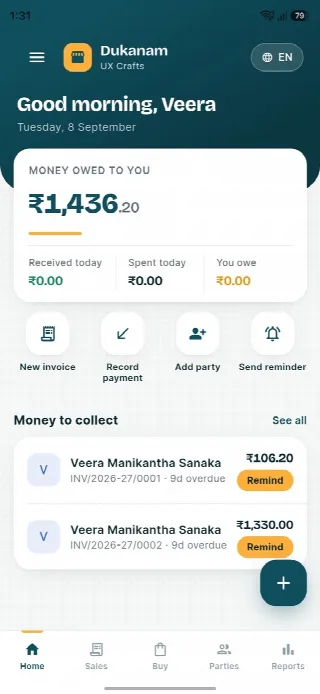
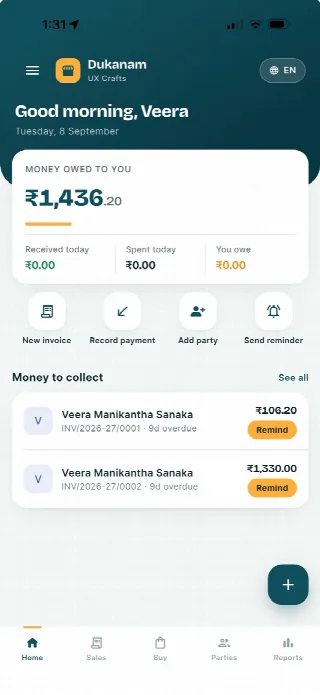
Step away from the counter without losing track of the day. Your collections, customer balances and next bill stay close at hand.
Money owed to you and recent customer balances, in one view.
Keep collections connected to the customer’s balance.
Go from the day’s summary to the invoice details.
Features follow your plan. Test your desktop scanner and receipt printer separately before switching a busy counter.
Android
iOS
Wholesale business billing questions
Yes. Supported document workflows can convert a quotation to an invoice while preserving the relationship.
Yes. Invoices, payments, receivables, statements, and ageing reports stay connected.
No. It prepares GST-aware documents and reports but does not claim direct portal or IRP submission.
No. Dukanam prepares GST-aware invoices and reports. It does not claim direct GST portal or IRP submission.
Explore another retail workflow
Add a few products, complete a sale, record the payment, and check the resulting stock movement yourself.