
01
Find and bill the gift
Search by name or SKU, scan packaged items, collect payment, and print the receipt.
- Name and SKU search
- Barcode scan
- UPI QR
- Receipt print
Gift shop billing software
Bill a changing gift and décor catalogue quickly while stock, supplier purchases, payments, returns, customer history, and reports stay connected.

Little Joys Gift Shop
Counter bill · Paid by UPI

A DAY IN THE STORE
Search by name or SKU, scan packaged items, collect payment, and print the receipt.
Record returned items and customer history without deleting the original transaction.
Review product sales and current stock, then connect incoming supplier invoices to the same record.
BUILT FOR REAL COUNTERS
The invoice, payment, stock movement, cash movement, and accounting entry remain connected without asking the person at the counter to become an accountant.
Before you switch
Gift baskets can contain several separately stocked products. Decide how you will record them before testing checkout and seasonal reordering.
Give different designs, sizes and colours clear item names and SKUs. Check that a search or scan finds the specific item the customer selected.
Bill separately stocked products as individual lines. If you sell a prepacked bundle as one item, verify the stock process; automatic component deduction is not promised.
Compare item sales and remaining quantities before reordering. Record supplier purchases and authorised returns consistently so the stock record remains useful.
These are the current plan names, monthly prices and feature limits. Owner POS supports barcode lookup with a compatible USB scanner. Item scanning and shelf-label tools follow the plan gates below. Extra staff POS logins have separate allowances; check those and annual prices on the pricing page.
| Capability | Free Essentials Free | Growth Plan ₹99.00/month | Advanced Plan ₹299.00/month |
|---|---|---|---|
| Inventory and stock movements | Up to 5 items | Up to 100 items | Unlimited items |
| Item scanning and shelf labels | Not included | Included | Included |
| Sales and purchase returns | Not included | Not included | Included |
| GST preparation | Not included | Not included | Included |
| Warehouse stock and transfers | Not included | Included | Included |
Do not assume a kit or bill-of-materials feature. Test how your chosen item setup affects component stock before selling bundles.
General invoicing does not imply engraving, printing or custom-order scheduling. Keep those requirements in an appropriate process and assess integrations separately.
A look inside Dukanam
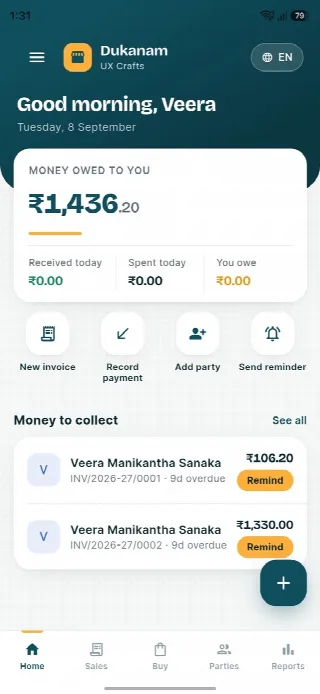
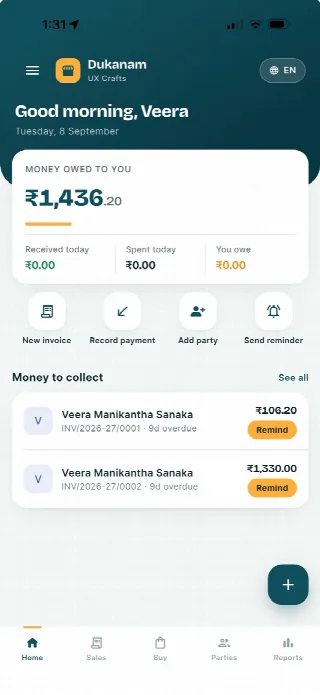
Step away from the counter without losing track of the day. Your collections, customer balances and next bill stay close at hand.
Money owed to you and recent customer balances, in one view.
Keep collections connected to the customer’s balance.
Go from the day’s summary to the invoice details.
Features follow your plan. Test your desktop scanner and receipt printer separately before switching a busy counter.
Android
iOS
Gift shop billing questions
Yes. Any item with a saved barcode can be found through barcode input at the POS.
Yes. Configure the business UPI ID to generate an exact-amount QR during checkout.
Yes. Sales returns retain the original sale and record the resulting reversals.
No. Dukanam prepares GST-aware invoices and reports. It does not claim direct GST portal or IRP submission.
Explore another retail workflow
Add a few products, complete a sale, record the payment, and check the resulting stock movement yourself.