
01
Bill a mixed basket quickly
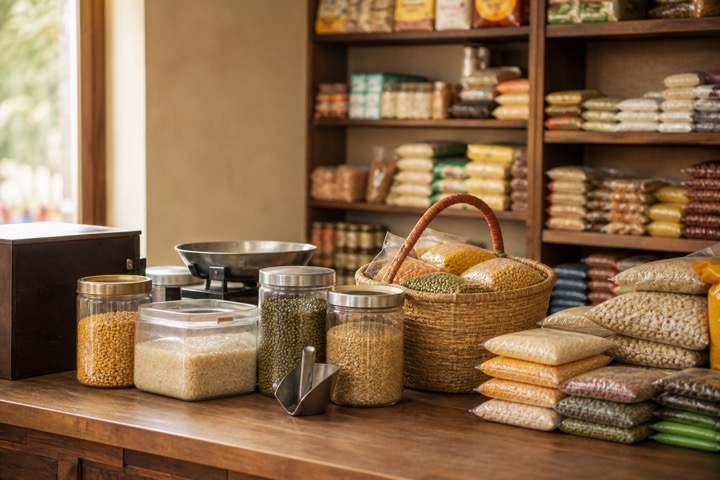
Scan packaged goods, search loose items, hold a cart, and collect cash, card, UPI, bank, or split payment.
- Barcode and SKU search
- Walk-in customer bills
- Held carts
- 80mm receipt printing
Kirana store billing software
Connect barcode billing, UPI and cash collection, customer dues, supplier purchases, stock, and GST preparation without turning the counter into an accounting desk.
Sharma Kirana Store
Counter bill · Paid by UPI

A DAY IN THE STORE
Scan packaged goods, search loose items, hold a cart, and collect cash, card, UPI, bank, or split payment.
Record supplier purchases so quantity, cost, payables, and accounting entries move together.
Review sales, collections, cash variance, dues, stock movement, tax summaries, and profit reports by role.
BUILT FOR REAL COUNTERS
The invoice, payment, stock movement, cash movement, and accounting entry remain connected without asking the person at the counter to become an accountant.
FROM KIRANA STORE OWNERS
We’re happy with Dukanam at Anandham. It’s been a positive experience for our shop, and we’re pleased to share our feedback.
AbdulAnandham
Kumbakonam, Tamil Nadu
Dukanam has made a positive impression on us at sk kirana and general store. We’re happy to share the experience from our shop in Jaipur.
Deepak Kumar Sharmask kirana and general store
Jaipur, Rajasthan
We’re happy with Dukanam at Shrivastava Flour Mill. It’s been a positive experience for our shop, and we’re pleased to share our feedback.
Varsha ShrivastavaShrivastava Flour Mill
Kota, Rajasthan
We’ve been pleased with our experience using Dukanam for Sri Varahi Traders. Our shop in Hyderabad has had a good experience with the app.
Venkata Srinivas BondalapatiSri Varahi Traders
Hyderabad, Telangana
At MAHAKALI FOODS in Chandrapur, we use Dukanam to create invoices and maintain customer records. We’re pleased with our experience of using it for our business.
VISHAL RAMGIRWARMAHAKALI FOODS
Chandrapur, Maharashtra
Before you switch
Use a few sample items first. Check the bill, the payment and the remaining stock together; each tells a different part of the same sale.
Give each packaged item its own barcode or SKU. For loose goods, choose the selling unit and enter the measured quantity: for example, 0.500 kg of rice. Quantity entry supports three decimal places; an automatic weighing-scale connection is not required or promised.
Scan a packet, search for the loose item, and check quantities before payment. A common USB scanner works as keyboard input. Try an 80mm receipt on your own printer and browser before relying on it at a busy counter.
Choose the customer when a balance needs to be tracked. Record the amount collected and review what remains due. An exact-amount UPI QR helps the customer pay; check the payment before recording it as received.
Record a supplier purchase, then compare the item quantity before and after a sale. Review customer dues, supplier balances and the cash-register closing report on a plan that includes those workflows.
These are the current plan names, monthly prices and feature limits. Owner POS supports barcode lookup with a compatible USB scanner. Item scanning and shelf-label tools follow the plan gates below. Extra staff POS logins have separate allowances; check those and annual prices on the pricing page.
| Capability | Free Essentials Free | Growth Plan ₹99.00/month | Advanced Plan ₹299.00/month |
|---|---|---|---|
| Packaged and loose-item stock | Up to 5 items | Up to 100 items | Unlimited items |
| Item scanning and shelf labels | Not included | Included | Included |
| Sales and purchase returns | Not included | Not included | Included |
| GST preparation | Not included | Not included | Included |
| Warehouse stock and transfers | Not included | Included | Included |
Check current free-plan availability and included basic workflows on the pricing page. Paid features depend on the selected plan; paid plans do not include a free trial. Check the current plan comparison before choosing barcode POS, tax preparation or staff access.
Try your scanner, receipt printer, internet connection and everyday items. Confirm the features and user limits in your plan. Do not assume offline counter operation or automatic bank confirmation without testing the supported workflow.
A look inside Dukanam
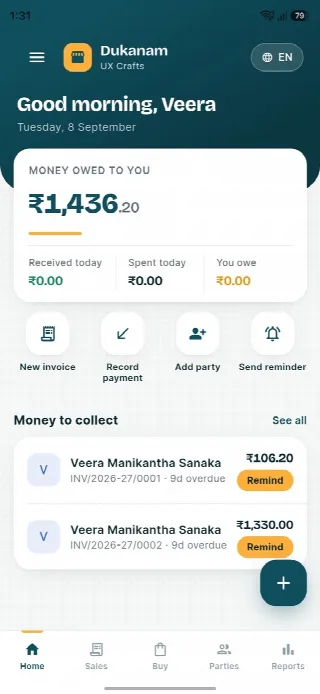
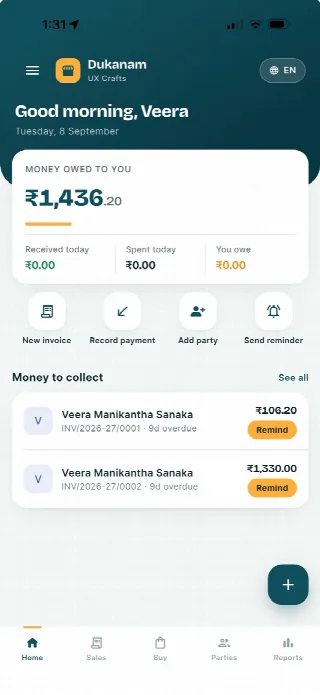
Step away from the counter without losing track of the day. Your collections, customer balances and next bill stay close at hand.
Money owed to you and recent customer balances, in one view.
Keep collections connected to the customer’s balance.
Go from the day’s summary to the invoice details.
Features follow your plan. Test your desktop scanner and receipt printer separately before switching a busy counter.
Android
iOS
Kirana store billing questions
Yes. Common USB barcode scanners work as keyboard input in the point-of-sale screen.
Yes. Add the shop UPI ID and the POS can generate an exact-amount QR for the current sale.
Supported plans track stock movements for purchases, sales, returns, and adjustments.
No. Dukanam prepares GST-aware invoices and reports. It does not claim direct GST portal or IRP submission.
Explore another retail workflow
Add a few products, complete a sale, record the payment, and check the resulting stock movement yourself.