
01
Complete the sale
Search or scan the item, choose the customer, collect payment, and print the bill.
- Barcode and SKU search
- Walk-in sales
- UPI and cash
- Receipt printing
Footwear store billing software
Connect quick billing, product lookup, exchanges and returns, purchases, supplier balances, and daily sales reporting in one retail workspace.

Stepwell Footwear
Counter bill · Paid by cash

A DAY IN THE STORE
Search or scan the item, choose the customer, collect payment, and print the bill.
Use sales returns so reversed quantity and value are visible rather than manually overwritten.
Review stock and sales, then record supplier orders and bills when replenishment arrives.
BUILT FOR REAL COUNTERS
The invoice, payment, stock movement, cash movement, and accounting entry remain connected without asking the person at the counter to become an accountant.
Before you switch
A style may sell well while a particular size runs out. Give each sellable pair variation an identifiable record before evaluating checkout and returns.
Create items such as “Walking shoe · Black · Size 8” and “Walking shoe · Black · Size 9”, with distinct SKUs and quantities. Use the item catalogue rather than assuming a dedicated variant matrix.
Search or scan the item, check its size description and bill the number of pairs. Use a consistent unit when recording supplier purchases and sales.
Record the returned pair through the sales-return workflow, then record the replacement sale separately. Check both stock quantities and the payment difference in the resulting records.
These are the current plan names, monthly prices and feature limits. Owner POS supports barcode lookup with a compatible USB scanner. Item scanning and shelf-label tools follow the plan gates below. Extra staff POS logins have separate allowances; check those and annual prices on the pricing page.
| Capability | Free Essentials Free | Growth Plan ₹99.00/month | Advanced Plan ₹299.00/month |
|---|---|---|---|
| Inventory and stock movements | Up to 5 items | Up to 100 items | Unlimited items |
| Item scanning and shelf labels | Not included | Included | Included |
| Sales and purchase returns | Not included | Not included | Included |
| GST preparation | Not included | Not included | Included |
| Warehouse stock and transfers | Not included | Included | Included |
This guide uses separate item records for each size and colour. Confirm any need for a dedicated size-grid interface before choosing the software.
Review item-level sales and stock for your separately named sizes. Check report access in the current plan comparison.
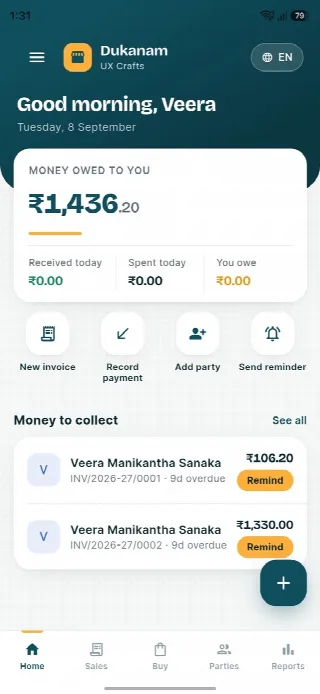
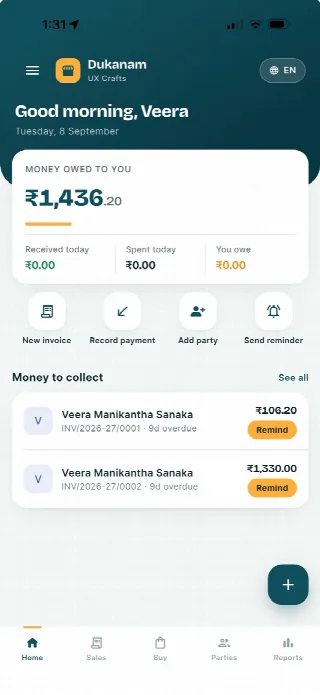
A look inside Dukanam
Step away from the counter without losing track of the day. Your collections, customer balances and next bill stay close at hand.
Money owed to you and recent customer balances, in one view.
Keep collections connected to the customer’s balance.
Go from the day’s summary to the invoice details.
Features follow your plan. Test your desktop scanner and receipt printer separately before switching a busy counter.
Android
iOS
Footwear store billing questions
Yes. Both identifiers can be used in the point-of-sale flow.
Yes. Sales returns keep the corresponding stock and accounting movement traceable.
Yes. Purchase documents and supplier payment records connect to payable balances.
No. Dukanam prepares GST-aware invoices and reports. It does not claim direct GST portal or IRP submission.
Explore another retail workflow
Add a few products, complete a sale, record the payment, and check the resulting stock movement yourself.