
01
Search a deep catalogue
Use names, barcodes, and SKUs to reach the required item without scrolling through the whole list.
- Item search
- Barcode scan
- SKU lookup
- Quantity editing
Hardware store billing software
Handle a long hardware catalogue with SKU and barcode search, retail or trade invoices, supplier purchases, customer credit, stock movement, and GST preparation.

Sri Ganesh Hardware
Trade invoice · Payment due

A DAY IN THE STORE
Use names, barcodes, and SKUs to reach the required item without scrolling through the whole list.
Use a quick walk-in bill or capture full buyer and GST details for a business invoice.
Keep receivables, supplier purchases, stock movements, and payments connected.
BUILT FOR REAL COUNTERS
The invoice, payment, stock movement, cash movement, and accounting entry remain connected without asking the person at the counter to become an accountant.
FROM HARDWARE STORE OWNERS
Our experience of Dukanam at SRINIVASAHARDWAREPAINTSANDELECTRICALS has been a good one. We’re pleased to share our story from our hardware business in Nagram.
Srinivasa rao SanakaSRINIVASAHARDWAREPAINTSANDELECTRICALS
Nagram, Andhra Pradesh
We’ve been pleased with our experience using Dukanam for H$R Enterprises. Our hardware business in GHAZIPUR ZAMANIA has had a good experience with the app.
Mohd Rashid AnsariH$R Enterprises
GHAZIPUR ZAMANIA, Uttar Pradesh
Before you switch
Fasteners, pipe fittings and tools may use different units. A useful trial starts with unit consistency, particularly when suppliers deliver boxes and customers buy individual pieces.
Include the relevant diameter, length, material or rating in the item name. Give visually similar fittings separate SKUs so a counter search identifies the intended part.
Enter the quantity in the configured unit and verify the stock deduction. If you buy a box and sell pieces, establish a consistent recording process; do not assume automatic pack conversion.
Attach credit sales to the correct customer and record subsequent collections. On a plan with warehouse stock, track the counter and godown as locations within the same business and record transfers between them before checking each location’s available quantity.
Illustrative example: keep M8 steel bolts in pieces at two warehouse locations within one business. Start with 20 at the counter and 80 in the godown.
| Step | Counter pieces | Godown pieces | Total pieces |
|---|---|---|---|
| Starting stock | 20 | 80 | 100 |
| Transfer 30 to the counter | 50 | 50 | 100 |
| Sell 12 from the counter | 38 | 50 | 88 |
These are the current plan names, monthly prices and feature limits. Owner POS supports barcode lookup with a compatible USB scanner. Item scanning and shelf-label tools follow the plan gates below. Extra staff POS logins have separate allowances; check those and annual prices on the pricing page.
| Capability | Free Essentials Free | Growth Plan ₹99.00/month | Advanced Plan ₹299.00/month |
|---|---|---|---|
| Inventory and stock movements | Up to 5 items | Up to 100 items | Unlimited items |
| Item scanning and shelf labels | Not included | Included | Included |
| Sales and purchase returns | Not included | Not included | Included |
| GST preparation | Not included | Not included | Included |
| Warehouse stock and transfers | Not included | Included | Included |
| Party price lists and quantity breaks | Not included | Not included | Included |
Quantity entry supports three decimal places. Choose a meaningful unit and test your typical quantity, price and rounded bill total.
No. SKU and barcode lookup identify the item record. Confirm specifications and suitability separately before supplying a part.
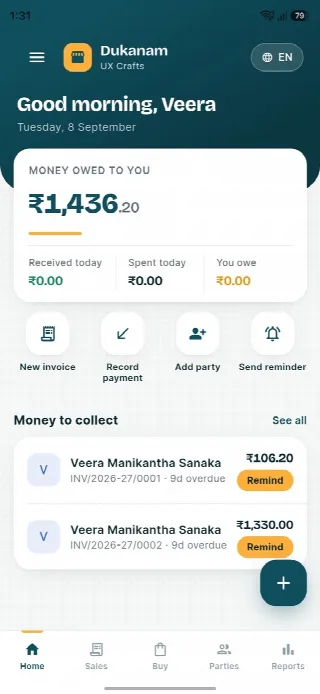
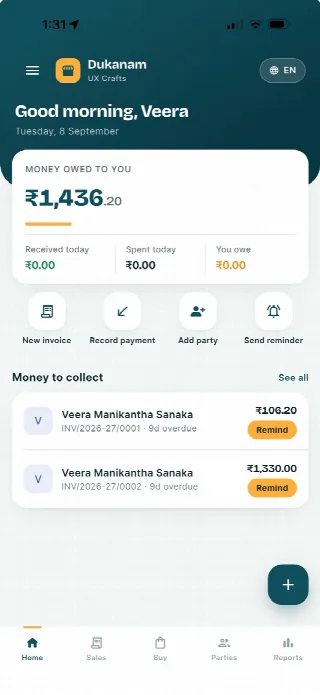
A look inside Dukanam
Step away from the counter without losing track of the day. Your collections, customer balances and next bill stay close at hand.
Money owed to you and recent customer balances, in one view.
Keep collections connected to the customer’s balance.
Go from the day’s summary to the invoice details.
Features follow your plan. Test your desktop scanner and receipt printer separately before switching a busy counter.
Android
iOS
Hardware store billing questions
Yes. The B2B flow captures buyer, GST, place-of-supply, and payment-term details.
An item SKU can be used for fast point-of-sale lookup.
Yes. Invoices, payments, receivables, and customer balances remain connected.
No. Dukanam prepares GST-aware invoices and reports. It does not claim direct GST portal or IRP submission.
Explore another retail workflow
Add a few products, complete a sale, record the payment, and check the resulting stock movement yourself.