
01
Bill any basket
Search a phone by item or SKU, scan an accessory barcode, add both to one invoice, and collect payment.
- Name and SKU search
- Barcode accessories
- Split payments
- Invoice printing
Mobile store billing software
Run product and accessory billing, GST-aware invoices, multiple payment modes, stock movement, supplier purchases, returns, and business reporting together.

Connect Mobile Store
Retail invoice · Paid by UPI

A DAY IN THE STORE
Search a phone by item or SKU, scan an accessory barcode, add both to one invoice, and collect payment.
Record supplier orders, purchase invoices, payments, and returns alongside stock movement.
Review sales, stock value, collections, customer balances, and profit reports.
BUILT FOR REAL COUNTERS
The invoice, payment, stock movement, cash movement, and accounting entry remain connected without asking the person at the counter to become an accountant.
Before you switch
Keep storage and colour combinations as separate items, then use serial tracking to identify each handset by its IMEI. Test the handset and accessory records before moving your counter.
Create a separate item for each storage and colour combination, with a distinct SKU. Use clear accessory names so cables and chargers are not confused during checkout.
Add the handset and accessories as separate invoice lines. Verify tax settings and payment allocation, and review any remaining customer balance after collection.
On a plan with serial tracking, enable it for the item and record each unit’s serial or IMEI when adding stock. Select the actual unit on the sale, save its warranty end date when known, and trace its purchase, sale and authorised return history. Serial-tracked items use whole units and cannot also use batch tracking. Repair jobs, trade-ins and finance-provider integrations require a separate process.
Illustrative example: receive two units of the same model with different IMEIs. “Handset A” and “Handset B” below are sample labels; enter the actual IMEI from each device in your own test.
| Step | Handset A | Handset B | Units in stock |
|---|---|---|---|
| Receive both handsets | Available | Available | 2 |
| Sell both on one invoice | Sold | Sold | 0 |
| Return Handset B against that invoice | Sold | Returned | 1 |
These are the current plan names, monthly prices and feature limits. Owner POS supports barcode lookup with a compatible USB scanner. Item scanning and shelf-label tools follow the plan gates below. Extra staff POS logins have separate allowances; check those and annual prices on the pricing page.
| Capability | Free Essentials Free | Growth Plan ₹99.00/month | Advanced Plan ₹299.00/month |
|---|---|---|---|
| Inventory and stock movements | Up to 5 items | Up to 100 items | Unlimited items |
| Item scanning and shelf labels | Not included | Included | Included |
| Sales and purchase returns | Not included | Not included | Included |
| GST preparation | Not included | Not included | Included |
| Warehouse stock and transfers | Not included | Included | Included |
| Serial / IMEI and warranty records | Not included | Not included | Included |
A SKU identifies the model or variant. On a plan with serial tracking, enable serial tracking for that item and enter each handset’s IMEI as its individual serial; select that unit when selling or returning it. Warranty end dates and unit history are recorded separately from the model SKU.
No. Recording a supported payment is separate from offering or integrating a financing service. Check your finance-provider process independently.
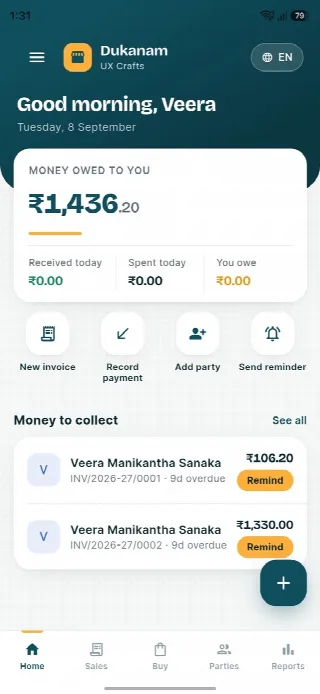
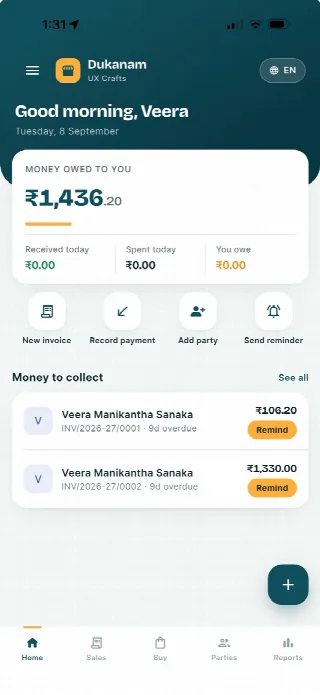
A look inside Dukanam
Step away from the counter without losing track of the day. Your collections, customer balances and next bill stay close at hand.
Money owed to you and recent customer balances, in one view.
Keep collections connected to the customer’s balance.
Go from the day’s summary to the invoice details.
Features follow your plan. Test your desktop scanner and receipt printer separately before switching a busy counter.
Android
iOS
Mobile store billing questions
Yes. Any configured items can be added to the same invoice or POS sale.
Yes. Supported payment modes include cash, card, bank, and UPI.
Yes. On a plan with serial tracking, enable it for the handset item and record each IMEI as an individual serial. Track the unit through purchases, sales and returns, with a warranty end date when known. Repair-job management is a separate requirement.
No. Dukanam prepares GST-aware invoices and reports. It does not claim direct GST portal or IRP submission.
Explore another retail workflow
Add a few products, complete a sale, record the payment, and check the resulting stock movement yourself.