
01
Separate shade and pack size
Use distinct items for each brand, shade, finish and tin size. Verify the selected SKU against the tin at the counter.
- Wall paint · 1 L
- Primer · 1 L
Paint shop billing software
Connect paint tins, primers, brushes, supplier invoices and painter or contractor balances with clear item-level records.

Dukanam · paint shop
Illustrative bill · Sample prices

A DAY IN THE STORE
Use distinct items for each brand, shade, finish and tin size. Verify the selected SKU against the tin at the counter.
Keep purchases and sales in a consistent unit. Bill a one-litre tin separately from a four-litre tin; do not assume automatic decanting or volume conversion.
Record supplier invoices against the correct item and selling unit. Check receipts, returns and outstanding balances; stock tracking depends on the selected plan.
BUILT FOR REAL COUNTERS
The invoice, payment, stock movement, cash movement, and accounting entry remain connected without asking the person at the counter to become an accountant.
Before you switch
Use your own product catalogue to test a complete sale, purchase and return. Connect paint tins, primers, brushes, supplier invoices and painter or contractor balances with clear item-level records.
Test two pack sizes of the same shade and two finishes of the same colour. Confirm each has a distinct item name and SKU on the invoice.
Document how a finished tinted tin will be identified and billed. Verify any separate tinting equipment and batch process; a paint-shop page does not imply machine integration.
Record a trade sale and payment, then review the remaining balance. Test your shop’s return policy with a representative item before importing the full catalogue.
Yes. Give each distinct product a clear item name and SKU, then use item or SKU search in POS. Verify the selected product and quantity before completing the sale.
Compare current invoice limits and stock, purchase and reporting features on the pricing page. Test the available workflow using representative items; specialist industry features are not implied by the store category.
A look inside Dukanam
The Android home screen brings money owed to you, money received and recent balances into one view. Open an invoice or record a payment when you need the detail behind a balance.
Explore the Android and iOS apps, then compare the features included in your plan. Test your desktop scanner and receipt printer separately before switching a busy counter.
Explore the mobile apps →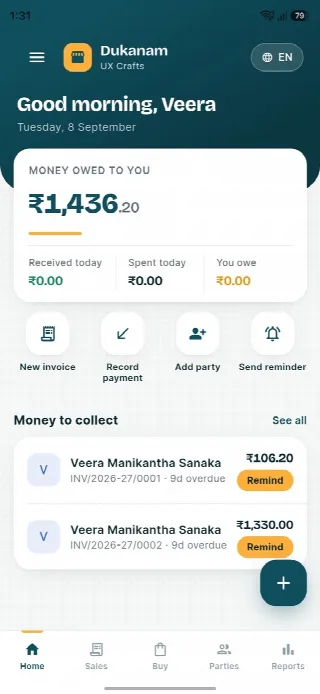
Paint shop billing questions
No tinting-machine integration, colour formulation or batch matching is promised. Verify those specialist needs separately.
Try a real invoice, purchase and return using your own items. Check the selected plan, taxes, units and specialist requirements before adopting the software.
No. Dukanam prepares GST-aware invoices and reports. It does not claim direct GST portal or IRP submission.
Explore another retail workflow
Add a few products, complete a sale, record the payment, and check the resulting stock movement yourself.